How Long Does It Take Vimeo to Process a Video?
When users search “how long does it take Vimeo to process a video?”, they are usually facing a real-time issue: their video is stuck on processing, taking longer than expected, or they want to know the expected time before publishing. Vimeo’s processing time varies depending on resolution, file size, codec, internet speed, and even your Vimeo plan.
To better understand video processing, creators can also explore related topics such as Does Vimeo Allow You to Edit Videos? and AI Upscaling Options on Vimeo. These help clarify how Vimeo handles files behind the scenes.
How Long Does Vimeo Take to Process a Video?
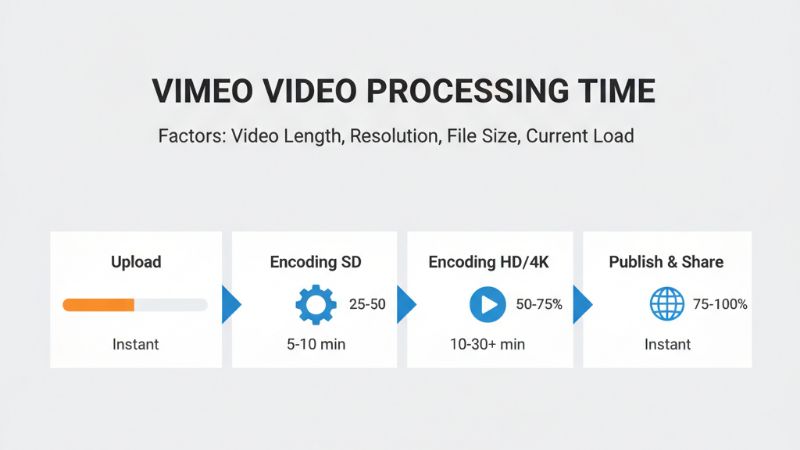
Most Vimeo videos process within 1 to 10 minutes depending on the resolution and file size.
Standard-definition videos finish the fastest, while HD and 4K videos can take significantly longer, especially during peak upload hours. Vimeo additionally re-encodes your video into multiple resolutions (SD, 720p, 1080p, sometimes 2K and 4K), which affects total processing time.

Typical Vimeo Processing Times (by Resolution)
| Resolution |
Typical File Size |
Average Processing Time |
Notes |
| 480p (SD) |
50–200 MB |
30 seconds – 2 minutes |
Fastest processing; minimal encoding required |
| 720p (HD) |
100–500 MB |
1 – 3 minutes |
Common for quick uploads |
| 1080p (Full HD) |
500 MB – 2 GB |
2 – 7 minutes |
Longer encoding due to larger frame data |
| 4K (Ultra HD) |
2 – 20 GB |
5 – 20 minutes+ |
Vimeo re-encodes multiple 4K variants; can queue during peak times |
For content using advanced audio formats, users should also check Does Vimeo Support 5.1 Surround Sound?.
Why Vimeo Processing Time Varies
Vimeo video processing is influenced by a combination of technical and user-based factors. Understanding these helps clarify why your video might take 30 seconds—or 20 minutes—to complete.
- File Size: Larger files require more encoding time.
- Resolution: HD and 4K take longer due to higher pixel counts.
- Bitrate: Higher bitrates mean heavier encoding.
- Codec Type: H.264 processes faster than HEVC (H.265).
- Server Load: Peak upload times slow down processing queues.
- Your Internet Upload Speed: Uploading slowly delays the encoding start time.
Vimeo also runs each file through its transcoding pipeline to produce multiple playback versions, so more complex videos require additional time.
Vimeo Plans and Processing Speed Differences
One of the most overlooked factors influencing Vimeo processing speed is your subscription tier. Higher plans generally receive faster encoding priority.
| Plan |
Processing Speed |
Comments |
| Basic (Free) |
Slow – Medium |
Lowest encoding priority; limited features |
| Plus |
Medium |
Better upload and processing speeds |
| Pro |
Fast |
Faster encoding queue + better performance |
| Business / Premium |
Fastest |
Top-tier priority in processing queues |
Creators using Vimeo for business or commercial content often upgrade to reduce waiting times, especially when exporting 4K videos frequently.

How Long Does Vimeo Take to Process HD Videos?
HD videos—specifically 720p and 1080p—are the most common uploads. Vimeo typically processes 720p videos within 1–3 minutes and 1080p videos within 2–7 minutes.
However, videos with high motion, heavy gradients, or high bitrates may require additional encoding passes, slowing down the process.
How Long Does Vimeo Take to Process 4K Videos?
4K videos require significantly more processing time due to their large file sizes and high pixel density. Vimeo may take anywhere from 5 minutes to over 20 minutes for 4K transcoding, and in some cases, additional resolutions must be generated for streaming compatibility.
If your 4K video includes HDR, 10-bit color, or advanced audio, processing time may increase further.
Why Is My Vimeo Video Stuck on “Processing”?
If your video is stuck on “Processing,” it typically points to one of the following issues:
- File corruption — Vimeo cannot decode certain frames.
- Unsupported codec or container — Some formats require re-exporting.
- Server queue delays — Heavy upload traffic slows down processing.
- Audio/video sync errors — Can force additional encoding passes.
- Your upload was incomplete — Partially uploaded files can't process.
If stuck longer than 30 minutes, re-uploading the file is usually the fastest fix.
How to Make Vimeo Process Your Video Faster
To reduce processing time, apply the following optimization techniques:
- Use H.264 for fastest encoding; avoid unnecessarily high bitrates.
- Upload at 1080p instead of 4K unless needed.
- Compress your video using tools like HandBrake before upload.
- Avoid uploading during peak hours (evenings or weekends).
- Ensure fast and stable internet during upload.
These optimizations reduce both upload and transcoding times.

Troubleshooting: Vimeo Processing Errors
If Vimeo fails to process your video, here are the most effective fixes:
- Re-export the video using H.264 encoding.
- Check for file corruption by replaying the entire video locally.
- Lower the resolution or bitrate.
- Ensure your audio format is supported.
- Try a different browser or disable extensions.
Most processing errors are related to unsupported codecs or damaged video data.
Final Tips for Smooth Vimeo Uploads
To avoid delays and reduce processing errors:
- Use recommended export settings from Vimeo’s documentation.
- Keep your video’s bitrate within standard limits.
- Upgrade your plan if you upload HD/4K content regularly.
- Test short segments before uploading long videos.
Many creators also use tools such as the Vimeo SMM Panel to promote videos after upload and improve visibility across platforms.
FAQs
1. Why does Vimeo take longer to process 4K videos?
Because 4K files require more encoding power and generate multiple playback versions.
2. Does video length affect processing time?
Yes—longer videos require more transcoding passes.
3. Why is Vimeo slower than YouTube for video processing?
YouTube uses a larger transcoding infrastructure, while Vimeo prioritizes quality over speed.
4. Can upgrading my Vimeo plan speed up processing?
Yes—higher-tier plans receive faster encoding priority.
5. What video format uploads fastest on Vimeo?
H.264 MP4 offers the fastest and most stable processing.