

What Happens If You Enter the Wrong Link in an SMM Panel?

What Happens If You Enter the Wrong Link in an SMM Panel?

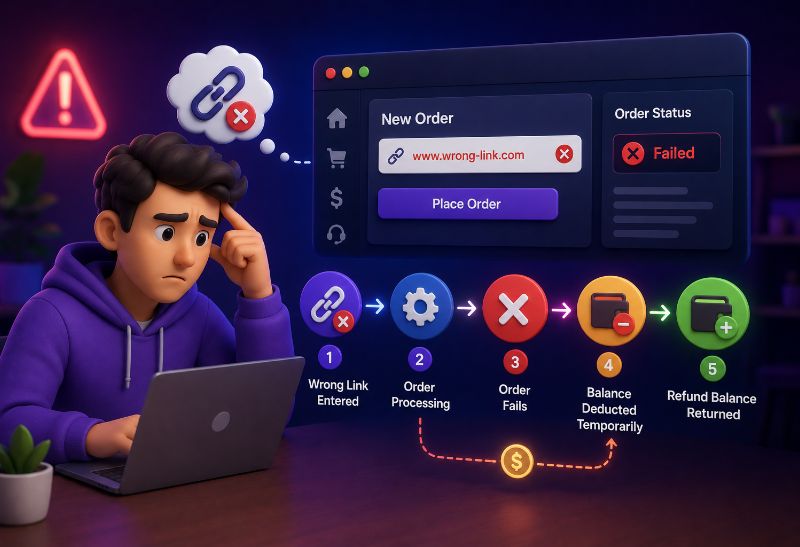
Entering the wrong link in an SMM panel is one of the most common beginner mistakes. A user may paste a profile link instead of a post link, choose the wrong video URL, submit an expired invite link, or copy a valid link that belongs to the wrong target. That is why many users ask: What Happens If You Enter the Wrong Link in an SMM Panel? ⚠️

If you use an Instagram Smm Panel or any other social media panel, the result depends on the order status, service rules, provider automation, and whether the wrong link is invalid or still valid. A wrong link may be cancelled, stay pending, become partial, or even complete on the wrong target if the system accepts it.


What Happens If You Enter the Wrong Link in an SMM Panel?

Direct answer: If you enter the wrong link in an SMM panel, the order may stay Pending, get Cancelled, become Partial, deliver to the wrong target, or complete without being fixable. The result depends on whether the link is invalid, valid but wrong, private, unsupported, already processing, or already completed. If you notice the mistake, open a support ticket immediately with the Order ID, wrong link, correct link, service name, and current status.

In simple words, What Happens If You Enter the Wrong Link in an SMM Panel? depends on timing. If the order is still waiting, support may be able to review it. If the order has already started, the provider may continue delivery to the submitted link. If the order is already Completed, the result usually cannot be moved to a new link.

The most important thing is to act fast. Do not place a duplicate order immediately. Do not delete the wrong target. Do not change the correct target before support replies. Open one clear ticket and include complete details.

Want to avoid wrong-link mistakes before placing orders? Create your NiceSMMPanel account, start with a small test order, and review service rules carefully before scaling.
Sign Up and Test First

Why the Correct Link Matters in an SMM Panel Order

The link tells the panel where the service should be delivered. A follower service usually needs a profile link, while likes, views, comments, saves, shares, and reactions usually need a direct content link. A Telegram member order may need a channel, group, or invite link, while a YouTube view order usually needs a video or Shorts link.

If you are new to how panels process services and orders, What is an SMM panel? explains the basic dashboard structure behind services, links, quantities, balance, and order status.

A correct link helps the system match the selected service to the right target. A wrong link can confuse the provider, break the order, or send delivery somewhere you did not intend.


Wrong Link vs Invalid Link: What Is the Difference?

A wrong link and an invalid link are not the same. A wrong but valid link opens correctly, but it points to the wrong post, profile, video, channel, group, track, or content. An invalid link does not work, belongs to the wrong platform, is deleted, private, expired, or not supported by the selected service.

This difference matters because valid wrong links can be harder to cancel. The panel may not know the link is wrong from your perspective. It may only see that the URL is accessible and matches the service format.

Link Type Meaning Common Result
Wrong but valid link The URL works, but it is not the target you intended. Order may deliver to the wrong target and may not be stoppable.
Invalid link The URL is broken, deleted, unsupported, or wrong-platform. Order may stay pending, fail, cancel, or be reviewed.
Private or restricted link The link exists but cannot be accessed publicly. Order may fail, stay pending, or cancel.
Expired invite link The invite used to work but no longer accepts joins. Telegram or Discord member orders may fail.
Wrong service link The link does not match the selected service type. Order may cancel, stay pending, or process incorrectly.

What Happens If the Wrong Link Is Still Valid?

If the wrong link is still valid, the system may treat it as a real target and send the order there. For example, if you order Instagram likes and paste the wrong Instagram post link, the provider may deliver likes to that wrong post. If the order starts, support may not be able to move the result to the correct post.

This is the most risky type of wrong-link mistake because the link technically works. The problem is not that the URL is broken; the problem is that it belongs to the wrong target.

Before ordering, users should always open the link in a browser or app and confirm that it points to the exact post, profile, video, channel, or content they want to use.

Need a safer way to test your first order? Join NiceSMMPanel, choose a small quantity, and confirm the exact link format before placing larger campaigns.
Create Account and Start Small

What Happens If the Link Is Invalid or Unsupported?

If the link is invalid, broken, private, expired, or unsupported by the selected service, the order may stay Pending, fail validation, become Cancelled, or be reviewed by support depending on the provider and panel rules. Invalid links are often easier to detect than valid wrong links.

If you are unsure which URL belongs to which service, What Link Should You Use for an SMM Panel Order? explains when to use a profile link, post link, video link, channel link, group link, invite link, track link, or content-specific URL.

An invalid link may be cancelled and returned to balance in some cases, but users should not assume every invalid-link order is automatically refundable. The final result depends on service rules and provider handling.


Can You Change the Link After Placing an Order?

Usually, you cannot change the link after placing an SMM panel order because many orders are processed automatically. Once the panel sends the order to a provider or API, the target link may be locked. If the order has not started yet, support may be able to review it, but link changes are not guaranteed.

This is why prevention matters more than correction. The user should check the link before clicking submit, especially for services that route automatically or start quickly.

Order Stage Can the Link Be Changed? What to Do
Just submitted Best chance, but not guaranteed. Open support ticket immediately.
Pending Sometimes possible if provider has not accepted it. Send Order ID and correct link quickly.
Processing Difficult because order may already be routed. Ask support, but expect limits.
In Progress Usually very difficult. Support may review remaining amount only.
Completed Usually not fixable. Result usually cannot be moved.

Can Support Cancel a Wrong-Link Order?

Support may be able to cancel a wrong-link order only if the order has not started or has not been accepted by the provider. Once the order is already processing or delivering, cancellation is usually much harder. Cancellation also depends on the selected service, provider rules, and whether the link is valid or invalid.

If you do not understand how support requests work, What Is a Support Ticket in an SMM Panel? explains how to submit a clear message with Order ID, service name, link, screenshot, and short explanation.

A clear ticket should be opened fast. If you wait until the order is completed, support may only be able to explain what happened rather than stop the order.


Will You Get a Refund for a Wrong-Link Order?

Refunds for wrong-link orders depend on the panel rules, service type, order status, and whether the link is valid or invalid. If the order is cancelled before delivery, the balance may return to your wallet. If delivery already started or completed on a valid wrong link, a refund may not be available.

If the order was cancelled because the system could not process the link, it may follow the same logic as other cancellation cases. Why SMM Panel Orders Get Cancelled explains common cancellation reasons such as wrong links, private accounts, invalid quantity, and provider-side limits.

Users should not assume every wrong-link order is refundable. A valid wrong link can be treated as a completed order if the provider delivered to the submitted target.

Wrong-Link Situation Refund Possibility Important Note
Invalid link cancelled before delivery Possible depending on rules. Check balance and status.
Valid wrong link already delivered Usually difficult. Result may not be transferable.
Order still pending Possible review. Open ticket immediately.
Order partial Undelivered part may be reviewed. Support may check Remains.
User submitted wrong service/link type Depends on policy. Some services are not refundable after start.
Want fewer wrong-link errors? Sign up on NiceSMMPanel, read each service note, and test with a small order before using larger quantities.
Sign Up and Review Services

What Happens If the Order Already Started?

If the order already started, the panel may not be able to stop it or change the target link. The provider may continue delivering to the submitted link because that is the URL attached to the order. If the link is wrong but valid, the result may appear on the wrong post, profile, video, channel, group, or content.

If only part of the order was delivered, support may review whether the remaining amount can be cancelled, refunded, or left as partial. But if the order fully completes, moving the delivery to a new link is usually not possible.


What Happens If the Order Is Still Pending?

If the order is still Pending, there may be a better chance of support review because the order may not have started yet. Users should immediately open a support ticket and include the Order ID, wrong link, correct link, service name, and current status.

However, Pending status does not guarantee cancellation. Some orders may already be queued with the provider even if the dashboard still says Pending. Speed matters here, so the sooner you contact support, the better.


What Happens If the Order Is Completed on the Wrong Link?

If the order is completed on the wrong link, the result usually cannot be transferred to the correct link. The panel may treat the order as delivered because the provider completed the order according to the submitted URL. In that case, support may not offer a refund unless the panel has a special exception policy.

This is why checking the link before submission is more important than trying to fix the order after completion. Once a service finishes on the wrong target, the best practical lesson is to verify links more carefully before future orders.


Wrong Link Examples by Service Type

Most wrong-link mistakes happen because the user chooses the right platform but submits the wrong target type. A follower service usually needs a profile link, while a like or comment service needs a direct content link. A member service may need a group, channel, server, or invite link.

Service Type Correct Link Usually Needed Wrong-Link Example
Followers Profile link. Submitting a post link.
Likes Post, Reel, video, tweet, or content link. Submitting a profile link.
Views Video, Reel, story, post, or content link. Submitting a homepage or profile.
Comments Direct content link. Submitting the wrong post.
Members Group, channel, server, or invite link. Submitting a post or message link.
Subscribers Channel link. Submitting one video link.
Plays Track, podcast, or audio link. Submitting artist profile for track plays.
Saves Track, Pin, post, or content link. Submitting profile instead of content.

Wrong Link Examples by Platform

Different platforms need different link formats. This is why a link that works for one service may be wrong for another service. Users should always match the link type to the selected service, not just the platform name.

Platform Common Correct Link Rule
Instagram Followers need profile link; likes, views, and comments need post or Reel link.
TikTok Followers need profile link; views, likes, and comments need video link.
YouTube Subscribers need channel link; views, likes, and comments need video or Shorts link.
Telegram Members need channel, group, or invite link; post views need message link.
Facebook Page services need page link; post reactions need post link.
Twitter/X Followers need profile link; likes, reposts, and comments need post URL.
Spotify Plays need track link; followers need artist or profile link.
Discord Members usually need an active invite link.
Pinterest Saves and views usually need Pin link; followers need profile link.

What Should You Do Immediately After Submitting the Wrong Link?

If you realize you entered the wrong link, act immediately. Do not wait until the order completes. Open a support ticket as fast as possible and explain the mistake clearly. Include both the wrong link and the correct link so support can understand the issue.

If you want to understand the full post-order flow before deciding what to do, What Happens After You Place an SMM Panel Order? explains what happens after submission, including Order ID, Pending, Processing, Completed, Partial, and Cancelled stages.

  • Copy the Order ID from your dashboard.
  • Copy the wrong link you submitted.
  • Copy the correct link you wanted to use.
  • Check the current order status.
  • Open a support ticket immediately.
  • Do not place a duplicate order on the correct link yet.
  • Wait for support to confirm whether cancellation or correction is possible.
Want a dashboard that helps you review orders clearly? Join NiceSMMPanel and track Order ID, service name, link, status, and support tickets from one place.
Join NiceSMMPanel

What Information Should You Send to Support?

A wrong-link support ticket should be clear and complete. Support needs the exact order details to check whether the order can still be stopped, cancelled, corrected, or reviewed.

For broader support-ticket context, HubSpot’s guide on how to create tickets explains how tickets help organize and track support requests. The same idea applies in an SMM panel: a clear ticket with complete order details is easier to review.

Ticket Detail Why It Helps
Order ID Helps support find the exact order.
Service name Shows what type of delivery was requested.
Wrong link submitted Shows what target was entered by mistake.
Correct link Shows what target you intended to use.
Current order status Helps support judge whether correction may still be possible.
Order time Helps support understand how quickly you reported the issue.
Screenshot if useful Provides visible proof of the mistake or dashboard status.

How to Avoid Wrong-Link Orders in the Future

The best way to avoid wrong-link orders is to check the service description and open the link before submitting. The link should match the service type, platform, and target. Users should avoid shortened links, private targets, expired invite links, and links copied from the wrong account or post.

Beginner mistakes are common when users rush. 10 Common Mistakes to Avoid When Using an SMM Panel explains other errors such as wrong links, duplicate orders, ignoring service notes, and choosing services too quickly.

  • Read the service description before ordering.
  • Check whether the service needs a profile, post, video, channel, group, track, or invite link.
  • Open the link in a browser or app before submitting.
  • Make sure the target is public and accessible.
  • Avoid shortened links unless the panel allows them.
  • Do not change username, delete content, or make the account private during delivery.
  • Start with a small test order if you are unsure.

Common Beginner Mistakes With SMM Panel Links

Wrong-link errors usually happen because users do not match the service type with the correct target URL. A service may look simple, but the required link can change depending on whether the order is for followers, likes, views, comments, members, subscribers, plays, or saves.

Mistake What Can Happen? Better Approach
Pasting profile link for post likes Order may fail or target the wrong place. Use the direct post link.
Pasting post link for followers Service may reject the target. Use the profile link.
Using private profile Provider cannot access the target. Keep the target public.
Using shortened URL System may not validate the target properly. Use the original platform URL.
Using expired invite link Members cannot join. Use an active invite link.
Changing username mid-order Link may break. Keep the target unchanged.
Deleting content after order Delivery may fail. Keep content live.
Ordering duplicate links too quickly Conflicts, delays, or no refund may happen. Wait for the first order status.

What Happens After Delivery?

After delivery, the wrong-link order may be marked Completed, Partial, or Cancelled depending on the provider result. If it completed on a valid wrong link, the panel may not be able to move the result to the correct link. If it became Partial or Cancelled, support may review the remaining balance depending on service rules.

If the order is completed on the wrong target, the user should still save the Order ID and support conversation for reference. For future orders, the user should verify the link before submission because prevention is usually easier than correction.

✅ After any wrong-link issue, keep the Order ID, wrong link, correct link, and support ticket record until the case is fully resolved.


Final Thoughts on Wrong Links in SMM Panel Orders

So, What Happens If You Enter the Wrong Link in an SMM Panel? The order may stay Pending, get Cancelled, become Partial, deliver to the wrong target, or finish without being fixable. The result depends on link validity, order status, service rules, provider automation, and how quickly you contact support.

The final rule is simple: act immediately, but do not assume correction or refund is guaranteed. Open a support ticket with full details, avoid duplicate orders, and always verify the exact target link before placing future orders. ✅

Ready to place orders more carefully? Sign up on NiceSMMPanel, read service notes, test small, and confirm every link before scaling your next campaign.
Sign Up on NiceSMMPanel

FAQ About Wrong Links in SMM Panel Orders

The questions below answer common beginner concerns about wrong links, invalid URLs, order correction, cancellation, refund possibility, and what details to send to support.


What happens if I enter the wrong link in an SMM panel?

If you enter the wrong link, the order may stay pending, get cancelled, become partial, deliver to the wrong target, or complete without being fixable. The result depends on the service rules, order status, and whether the link is valid or invalid.


Can I change the link after placing an SMM panel order?

Usually, you cannot change the link after placing an order because many SMM panel orders are processed automatically. If the order has not started yet, support may review it, but link correction is not guaranteed.


Will I get a refund if I submitted the wrong link?

Refund depends on the panel policy, service type, and order status. Invalid links may sometimes be cancelled and refunded, but valid wrong links that already started or completed may not be refundable.


What should I do immediately after submitting the wrong link?

Open a support ticket immediately with the Order ID, wrong link, correct link, service name, and current status. Do not place a duplicate order until support replies.


How can I avoid wrong-link orders?

Read the service description, check the required link type, open the URL before submitting, keep the target public, avoid shortened links, and make sure the link matches the platform and service type.


What if the order already completed on the wrong link?

If the order already completed on a valid wrong link, the result usually cannot be moved to the correct link. Support may review the case, but refund or correction is not usually guaranteed after completion.